Free Shipping available on orders $299 & up!Shop our Specials»
  • Business Icon For Business & More icon arrow
    • Creative, Production & PostCreative, Production & Post
    • Corporate & EnterpriseCorporate & Enterprise
    • Higher EducationHigher Education
    • State, Local & K-12 EducationState, Local & K-12 Education
    • House of WorshipHouse of Worship
    • Systems IntegratorSystems Integrator
    • HealthcareHealthcare
    • Federal, State & Local GovernmentFederal, State & Local Government
    • Join Today!

      Already registered? Sign In

  • Region: Canada icon arrow
    • Select your preferredcountry / region:

    • USA RegionUSA + International
    • Canada RegionOWC Canada

    • Experience local shipping options and optimized product inventory for your region.

  • Phone Icon1-800-275-4576
  • Intl: 1-815-338-8685
MacSales.com Powered By OWC
Site Search
  • Blog
  • Support
  • Account
    • Hello, Sign In
    • My Account
    • Order Status
    • Write A Review
    • Warranty & Returns
  • Cart
MacSales.com Powered By OWC
  • Support
  • Chat Contact
  • Account
    • Hello, Sign In
    • My Account
    • Order Status
    • Write A Review
    • Warranty & Returns
  • Cart
  • Specials & Featured
  • Rocket Yard Blog
  • Chat
  • Support
      • Shop All
        • Internal Drives
        • External Drives
        • Apple & Macs
        • Docks & Connectivity
        • Cards & Readers
        • Batteries
        • Software & Apps
        • Cables & Adapters
        • Memory
        • PCIe Expansion
        • Specials & Featured
        CPU Loading (stress test) - iTunes & Photoshop L2 Cache Time
        Reference Apple System
        Blue & White G3/300MHz * Crashed about 30 minutes in before finish * 512k n/a
        Acceleration Cards
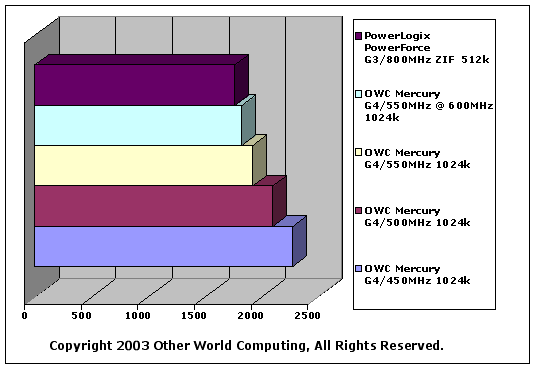
        OWC Mercury G4/450MHz 1024k 2278
        OWC Mercury G4/500MHz 1024k 2103
        OWC Mercury G4/550MHz 1024k 1924
        OWC Mercury G4/550MHz @ 600MHz 1024k 1831
        PowerLogix PowerForce G3/800MHz ZIF 512k 1768


        Time to execute Photoshop 7 test script while iTunes visuals are running full screen in the background. All times in seconds, shorter bars are better.

        The above test is a seriously difficult task for any processor to run. If you wish to duplicate it, this is what is involved. I would use caution - this CAN AND WILL overheat processors.

        If you have problems with your machine locking up while running this test, investigate the thermal bond between the heatsink and processor - this will stress your computer more than anything!

        • Set your monitor's resolution to 1280x1024, millions of colors.
        • Open iTunes and play a song. For this test I chose a 10 minute live version of a Rolling Stones track, and had it repeat in a loop so all of the processors tested in this series would be having the same visual patterns displayed.
        • Some of the iTunes visuals differ in CPU load, and this levels the playing field, so to speak.
        • Expand the iTunes window to fill the screen
        • Activate the visual effects, at full screen resolution.
        • Open Photoshop
        • Select the action script to run, and start the stopwatch.
        Helpful Links
        • About Us
        • DIY Install Videos
        • Join our Affiliate Network
        • Where to Buy (opens in a new tab)
        • Accessibility Statement
        • Sustainability is Good Business
        • Join the MacSales.com Team
        • Media+Newsroom
        • Privacy Promise
        • MacSales.com for Business
        Join the MacSales.com Newsletter

        Join hundreds-of-thousands of tech enthusiasts across the planet and gain access to specials, clearance, and holiday savings on the OWC upgrades, drives, and docks everyone loves.

        Newsletter Subscription

        Please enter a valid email address.

        • bbb
        © 2000-2026 Other World Computing, Inc., All Rights Reserved. Site Terms Guest ID:
        Your Privacy Choices
        This item has been added to your cart