Mac mini Memory and Solid State Hard Drive Benchmarks |
More memory equals a faster Mac. It's been our company mantra for quite a long time. With the addition of our new Mercury Extreme SSD line, we now have another contender for drastically increasing performance on your Mac.
As shown in the benchmarks below, adding more memory to your Mac mini gradually boosts performance and allows you to run more processes and programs at once regardless of which model mini you have.
The 2.3 GHz Intel Core i5 from Mid 2011 completed the Photoshop Action Test Medium 379% faster from the stock 2GB to a maximized 16GB of memory (following the OWC MaxRAM guidelines).
By adding an OWC Mercury Extreme Pro 6G SSD to the stock configuration of the Mac mini Server 2.0GHz not only did it run the Photoshop Action Test Medium 4 times faster alone, but it cut down machine boot time by almost half!
By using the two together, speed gains are higher still - making us rethink and expand our company mantra:
More Memory = Faster Mac
OWC SSD Drive = Even Faster Mac
More memory and an OWC SSD Drive = Fastest Mac.
|
 |
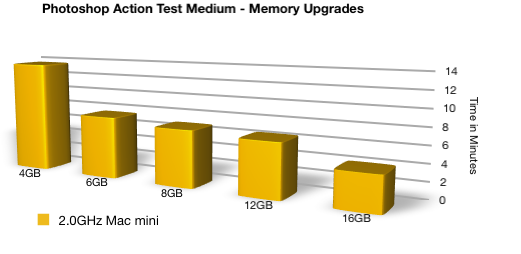
Adding more memory to your Mac mini
can make a dramatic increase in performance.
Lower times are better. |
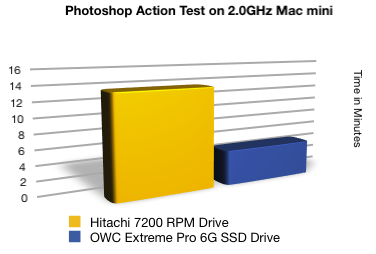
Installing the OWC Mercury Extreme Pro 6G SSD
as the boot drive for the system
also improves performance dramatically.
Lower times are better. |
|
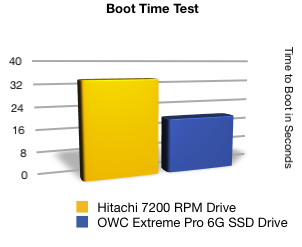
Start your Mac mini almost twice as fast
by using an OWC Mercury Extreme Pro 6G SSD as your boot drive.
Lower times are better.
See the Boot Time Test shootout on a MacBook Pro in action |
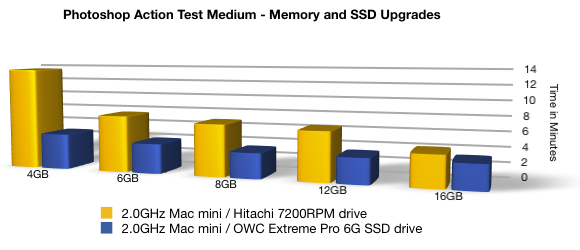
...and for the best performance, install both!
Lower times are better. |
|
| Other World Computing Benchmark Result Tables |
Looking to delve deeper? Unlike most benchmarking sites, we put every configuration of the Mac mini to the test so you can see exactly what your machine is capable of with additional memory and a Solid State Drive.
Jump to Results:
|
See Benchmark Results for Other Models:
|
|
 "Adobe Photoshop CS5 Medium Action Test" Results
This test measures the time (in seconds) it takes to execute a custom action script comprising of 45 commonly-used, memory-intensive processes on a 17,500 pixel wide image using Adobe Photoshop CS5. It is designed to represent a system-straining photo editing session of a graphic artist on a MacBook/MacBook Pro/Mac miniesuch as with multiple images, images with multiple layers, or large images such as retail signage, movie posters, event signage, promotional banners and more. These same type of results can be expected from video production suites and other 64 bit applications.
No other processes are running in the background besides those that keep the machine itself running. Memory Usage is left at the default 71% of system memory. Increasing this slider can speed up the test when more memory has been added to the system, however with lower memory amounts, make sure you're leaving enough resources for any additional processes running.
History and cache performance preferences are set as follows:
History States: 20
Cache Levels: 3
Cache Tile Size: 1028K
The only scratch disk used for the purposes of this test is the boot drive itself. No additional drives are installed in the system. Increased performance can be achieved through the use of additional scratch disks. For more information on optimizing your Mac for Adobe Photoshop CS5, we suggest checking out Lloyd Chambers' Mac Performance Guide article Optimizing Photoshop CS5 Performance.
Lower times are better.
| RAM Configuration |
1.0GB |
2.0GB |
4.0GB |
6.0GB |
8.0GB |
12.0GB |
16.0GB |
Mac mini Late 2012 "Unibody"
2.3 GHz Quad Core i7 (Macmini6,2) |
7200 RPM |
— |
— |
761.85 |
499.96 |
393.59 |
381.70 |
353.05 |
| OWC 6G SSD |
— |
— |
269.24 |
186.47 |
182.24 |
178.62 |
174.46 |
Mac mini Late 2012 "Unibody"
2.5 GHz Dual Core i5 (Macmini6,1) |
7200 RPM |
— |
— |
810.88 |
526.02 |
463.40 |
446.92 |
423.36 |
| OWC 6G SSD |
— |
— |
318.91 |
250.10 |
244.12 |
237.71 |
234.38 |
Mac mini Server Mid 2011 "Unibody"
2.0 GHz Quad Core i7 (Macmini5,3) |
7200 RPM |
— |
— |
813.13 |
450.70 |
411.34 |
387.53 |
349.90 |
| OWC 6G SSD |
— |
— |
284.44 |
220.26 |
206.36 |
201.11 |
196.77 |
Mac mini Mid 2011 "Unibody"
2.5 GHz Dual Core i5 (Macmini5,2) |
5400 RPM |
— |
— |
943.68 |
792.14 |
537.23 |
498.82 |
453.25 |
| OWC 6G SSD |
— |
— |
319.82 |
250.13 |
248.12 |
244.06 |
236.71 |
Mac mini Mid 2011 "Unibody"
2.3 GHz Dual Core i5 (Macmini5,1) |
5400 RPM |
— |
1843.69 |
922.40 |
575.25 |
533.66 |
519.23 |
486.30 |
| OWC 6G SSD |
— |
462.53 |
342.22 |
272.22 |
262.29 |
261.23 |
258.67 |
Mac mini Mid 2010 "Unibody"
2.66 GHz Core 2 Duo (Macmini4,1) |
5400 RPM |
— |
1334.61 |
793.56 |
731.58 |
647.89 |
— |
— |
| OWC 3G SSD |
— |
879.35 |
623.18 |
508.86 |
494.63 |
— |
— |
Mac mini Mid 2010 "Unibody"
2.4 GHz Core 2 Duo (Macmini4,1) |
5400 RPM |
— |
1828.94 |
993.26 |
863.51 |
816.67 |
— |
— |
| OWC 3G SSD |
— |
928.46 |
714.56 |
707.60 |
638.95 |
— |
— |
Mac mini 2009
2.53 GHz Core 2 Duo (Macmini3,1) |
5400 RPM |
— |
1976.91 |
1369.49 |
1031.83 |
917.59 |
— |
— |
| OWC 3G SSD |
— |
790.73 |
564.26 |
506.31 |
493.10 |
— |
— |
Mac mini 2009
2.26 GHz Core 2 Duo (Macmini3,1) |
5400 RPM |
2652.35 |
2094.84 |
1194.81 |
1125.80 |
1004.45 |
— |
— |
| OWC 3G SSD |
953.78 |
819.35 |
586.81 |
534.73 |
503.19 |
— |
— |
Mac mini 2009
2.0 GHz Core 2 Duo (Macmini3,1) |
5400 RPM |
2227.98 |
1757.26 |
992.85 |
976.22 |
855.73 |
— |
— |
| OWC 3G SSD |
974.78 |
824.56 |
620.10 |
575.59 |
552.41 |
— |
— |
Back To Top |
| |
"Adobe Photoshop CS5 Small Action Test" Results
This test measures the time (in seconds) it takes to execute a custom action script comprising of 45 commonly-used, memory-intensive processes on a 12,500 pixel wide image using Adobe Photoshop CS5. It is designed to represent a system-straining photo editing session of a graphic artist on a MacBook/MacBook Pro/Mac mini. These same type of results can be expected from video production suites and other 64 bit applications.
No other processes are running in the background besides those that keep the machine itself running. Memory Usage is left at the default 71% of system memory. Increasing this slider can speed up the test when more memory has been added to the system, however with lower memory amounts, make sure you're leaving enough resources for any additional processes running.
History and cache performance preferences are set as follows:
History States: 20
Cache Levels: 3
Cache Tile Size: 1028K
The only scratch disk used for the purposes of this test is the boot drive itself. No additional drives are installed in the system. Increased performance can be achieved through the use of additional scratch disks. For more information on optimizing your Mac for Adobe Photoshop CS5, we suggest checking out Lloyd Chambers' Mac Performance Guide article Optimizing Photoshop CS5 Performance.
Lower times are better.
| RAM Configuration |
1.0GB |
2.0GB |
4.0GB |
6.0GB |
8.0GB |
12.0GB |
16.0GB |
Mac mini Late 2012 "Unibody"
2.3 GHz Quad Core i7 (Macmini6,2) |
7200 RPM |
— |
— |
247.45 |
222.18 |
208.54 |
161.12 |
97.25 |
| OWC 6G SSD |
— |
— |
107.87 |
97.80 |
95.13 |
90.87 |
74.90 |
Mac mini Late 2012 "Unibody"
2.5 GHz Dual Core i5 (Macmini6,1) |
7200 RPM |
— |
— |
263.70 |
242.14 |
248.68 |
201.50 |
119.72 |
| OWC 6G SSD |
— |
— |
136.26 |
128.49 |
123.68 |
121.85 |
106.46 |
Mac mini Server Mid 2011 "Unibody"
2.0 GHz Quad Core i7 (Macmini5,3) |
7200 RPM |
— |
— |
258.44 |
220.26 |
206.36 |
168.92 |
102.15 |
| OWC 6G SSD |
— |
— |
119.46 |
111.43 |
102.71 |
100.77 |
88.98 |
Mac mini Mid 2011 "Unibody"
2.5 GHz Dual Core i5 (Macmini5,2) |
5400 RPM |
— |
— |
292.97 |
278.14 |
249.86 |
205.46 |
126.78 |
| OWC 6G SSD |
— |
— |
174.61 |
128.28 |
124.15 |
116.54 |
109.52 |
Mac mini Mid 2011 "Unibody"
2.3 GHz Dual Core i5 (Macmini5,1) |
5400 RPM |
— |
752.55 |
294.40 |
293.79 |
276.80 |
262.29 |
258.67 |
| OWC 6G SSD |
— |
214.44 |
181.51 |
137.10 |
133.90 |
128.41 |
122.49 |
Mac mini Mid 2010 "Unibody"
2.66 GHz Core 2 Duo (Macmini4,1) |
5400 RPM |
— |
460.41 |
318.18 |
297.81 |
268.88 |
— |
— |
| OWC 3G SSD |
— |
387.84 |
239.43 |
221.73 |
202.64 |
— |
— |
Mac mini Mid 2010 "Unibody"
2.4 GHz Core 2 Duo (Macmini4,1) |
5400 RPM |
— |
602.61 |
395.43 |
351.34 |
313.41 |
— |
— |
| OWC 3G SSD |
— |
388.63 |
333.18 |
330.51 |
346.41 |
— |
— |
Mac mini 2009
2.53 GHz Core 2 Duo (Macmini3,1) |
5400 RPM |
— |
624.47 |
506.10 |
423.01 |
327.73 |
— |
— |
| OWC 3G SSD |
— |
320.47 |
250.37 |
240.53 |
223.39 |
— |
— |
Mac mini 2009
2.26 GHz Core 2 Duo (Macmini3,1) |
5400 RPM |
1352.96 |
688.62 |
468.49 |
432.97 |
348.46 |
— |
— |
| OWC 3G SSD |
504.48 |
334.18 |
265.58 |
257.83 |
238.52 |
— |
— |
Mac mini 2009
2.0 GHz Core 2 Duo (Macmini3,1) |
5400 RPM |
1200.97 |
589.61 |
419.21 |
377.68 |
346.06 |
— |
— |
| OWC 3G SSD |
494.08 |
338.38 |
282.87 |
278.20 |
253.09 |
— |
— |
Mac mini 2006
1.83 GHz Core Duo (Macmini1,1) |
5400 RPM |
2085.15 |
1065.05 |
— |
— |
— |
— |
— |
| OWC 3G SSD |
843.30 |
563.77 |
— |
— |
— |
— |
— |
Back To Top |
 "HALO Frame Rate Test" Results
Recognized as one of the greatest achievements in video game entertainment, the Xbox version of Halo has already sold over 3 million units and continues to be a top seller. The Macintosh version adds 16-person online multiplayer, new vehicles, new weapons, new maps, customizable multiplayer games, the precision of playing with a mouse and keyboard and more.
For our testing, we ran the Timedemo Benchmark from the Intel-native version of the popular game, Halo v2.0.3
When Halo is launched in Timedemo mode, it will run through four fixed cinematic sequences from the game. Once it's finished, it generates a file called Timedemo.txt in the ~Documents\Halo directory. The contents of the file can be examined to see what settings were used in the timedemo, including what the average framerate for the demo was.
Results are the average frame rate (in frames per second) achieved. Higher results are better.
| RAM Configuration |
1.0GB |
2.0GB |
4.0GB |
6.0GB |
8.0GB |
12.0GB |
16.0GB |
Mac mini Late 2012 "Unibody"
2.3 GHz Quad Core i7 (Macmini6,2) |
7200 RPM |
— |
— |
160.17 |
164.04 |
178.58 |
179.36 |
186.27 |
| OWC 6G SSD |
— |
— |
175.33 |
182.95 |
185.99 |
186.15 |
187.92 |
Mac mini Late 2012 "Unibody"
2.5 GHz Dual Core i5 (Macmini6,1) |
7200 RPM |
— |
— |
145.37 |
146.12 |
146.79 |
149.99 |
159.01 |
| OWC 6G SSD |
— |
— |
161.56 |
163.46 |
166.15 |
167.26 |
168.41 |
Mac mini Server Mid 2011 "Unibody"
2.0 GHz Quad Core i7 (Macmini5,3) |
7200 RPM |
— |
— |
95.98 |
99.48 |
99.59 |
99.84 |
100.58 |
| OWC 6G SSD |
— |
— |
105.92 |
106.19 |
107.80 |
107.96 |
109.00 |
Mac mini Mid 2011 "Unibody"
2.5 GHz Dual Core i5 (Macmini5,2) |
5400 RPM |
— |
— |
158.65 |
173.30 |
173.96 |
175.93 |
210.81 |
| OWC 6G SSD |
— |
— |
210.89 |
212.50 |
212.86 |
214.08 |
215.25 |
Mac mini Mid 2011 "Unibody"
2.3 GHz Dual Core i5 (Macmini5,1) |
5400 RPM |
— |
89.4 |
90.48 |
94.87 |
95.16 |
96.30 |
99.29 |
| OWC 6G SSD |
— |
100.64 |
101.16 |
102.33 |
102.80 |
103.30 |
105.43 |
Mac mini Mid 2010 "Unibody"
2.66 GHz Core 2 Duo (Macmini4,1) |
5400 RPM |
— |
79.52 |
80.63 |
80.10 |
81.54 |
— |
— |
| OWC 3G SSD |
— |
108.04 |
109.46 |
109.57 |
116.86 |
— |
— |
Mac mini Mid 2010 "Unibody"
2.4 GHz Core 2 Duo (Macmini4,1) |
5400 RPM |
— |
76.71 |
76.86 |
77.15 |
78.68 |
— |
— |
| OWC 3G SSD |
— |
97.88 |
98.17 |
98.98 |
110.09 |
— |
— |
Mac mini 2009
2.53 GHz Core 2 Duo (Macmini3,1) |
5400 RPM |
— |
82.25 |
85.82 |
86.11 |
86.69 |
— |
— |
| OWC 3G SSD |
— |
83.58 |
94.33 |
94.81 |
97.70 |
— |
— |
Mac mini 2009
2.26 GHz Core 2 Duo (Macmini3,1) |
5400 RPM |
74.47 |
80.91 |
83.99 |
84.29 |
85.26 |
— |
— |
| OWC 3G SSD |
80.21 |
82.69 |
90.76 |
91.28 |
92.11 |
— |
— |
Mac mini 2009
2.0 GHz Core 2 Duo (Macmini3,1) |
5400 RPM |
73.41 |
73.29 |
80.82 |
83.24 |
85.75 |
— |
— |
| OWC 3G SSD |
76.27 |
85.08 |
85.44 |
85.65 |
97.52 |
— |
— |
Mac mini 2006
1.83 GHz Core Duo (Macmini1,1) |
5400 RPM |
23.03 |
26.30 |
— |
— |
— |
— |
— |
| OWC 3G SSD |
23.17 |
26.79 |
— |
— |
— |
— |
— |
Back To Top |
|
Want to check your setup against our numbers?
System preferences were also all left as close to factory defaults as possible with few exceptions. Under the Energy Saver pane, sleep has been turned off for both display and hard disk. Tests were run using a 21" LCD monitor at 1680x1050 resolution. No network connection, AirPort or Bluetooth settings are enabled in order to eliminate outside influences to the tests.
When a specific program is used outside its factory default, the change is noted at the beginning of each test. |
|
|
|
|


 1-800-275-4576