Free Shipping available on orders $299 & up!Shop our Specials»
  • Business Icon For Business & More icon arrow
    • Creative, Production & PostCreative, Production & Post
    • Corporate & EnterpriseCorporate & Enterprise
    • Higher EducationHigher Education
    • State, Local & K-12 EducationState, Local & K-12 Education
    • House of WorshipHouse of Worship
    • Systems IntegratorSystems Integrator
    • HealthcareHealthcare
    • Federal, State & Local GovernmentFederal, State & Local Government
    • Join Today!

      Already registered? Sign In

  • Region: Canada icon arrow
    • Select your preferredcountry / region:

    • USA RegionUSA + International
    • Canada RegionOWC Canada

    • Experience local shipping options and optimized product inventory for your region.

  • Phone Icon1-800-275-4576
  • Intl: 1-815-338-8685
MacSales.com Powered By OWC
Site Search
  • Blog
  • Support
  • Account
    • Hello, Sign In
    • My Account
    • Order Status
    • Write A Review
    • Warranty & Returns
  • Cart
MacSales.com Powered By OWC
  • Support
  • Chat Contact
  • Account
    • Hello, Sign In
    • My Account
    • Order Status
    • Write A Review
    • Warranty & Returns
  • Cart
  • Specials & Featured
  • Rocket Yard Blog
  • Chat
  • Support
      • Shop All
        • Internal Drives
        • External Drives
        • Apple & Macs
        • Docks & Connectivity
        • Cards & Readers
        • Batteries
        • Software & Apps
        • Cables & Adapters
        • Memory
        • PCIe Expansion
        • Specials & Featured
        Early 2009 Mac Pro Nehalem Upgrade Benchmarks

        Upgrading Memory in your
        Early 2009 Mac Pro 'Nehalem'

        Buy Mac Pro Memory
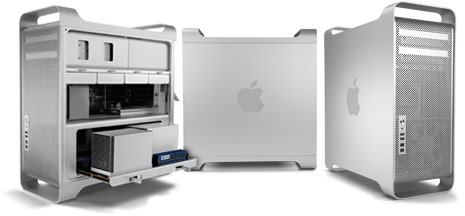
        Mac Pro 2009


        Independent Lab Testing*

        Well known performance benchmarking Rob-Art of BareFeats.com ran various tests which showed ”You never can be too thin, too rich, have too many cores, or have too much memory.”

        Adobe After Effects

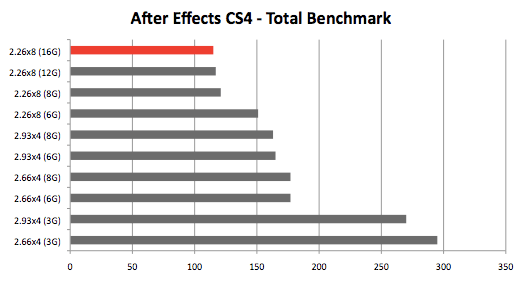
        Adobe After Effects CS4 (and CS3) spawns subprocesses -- one for each core -- when 'multiprocessing' is enabled in Preferences. Each of those subprocesses can grab up to 3GB of RAM. We typically use the Total Benchmark created by Brian Maffitt to benchmark with After Effects. If you run Activity Monitor during the rendering, you can not only observe the multiple subprocesses but you can observe how much real memory each of them is appropriating as the second phase of the project render progresses toward completion. When we had 16G installed, we observed 13GB of real memory in use.

        As a general rule, the more cores you have and the memory you have, the better After Effects can "breathe."

        Photoshop CS4

        Only certain functions/filters in Photoshop use multiple cores. A few examples of "MP aware" functions include Rotate, Gaussian Blur, Lighting Effects, Lens Flare, Pointilize, and Sharpen Edges.

        As for memory usage, though you can only specify up to 3GB memory cache in the Performance Preference panel, Mac OS X is clever enough to grab unused memory as a virtual scratch volume instead before handing off the task to the actual scratch disk. If you are editing RAW photos with lots of layers and lots of history states, having the 8 memory slots in the 8-core Nehalem at dual-channel speeds can be better than 6 sticks running at triple-channel speeds. That's because slower memory transfers are better than really slow hard disk hits.

        * "Independent Lab Testing" charts and commentary courtesy of BareFeats.com


        OWC Lab Testing

        by OWC Michael

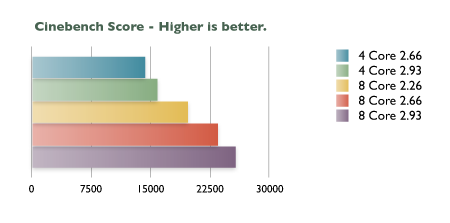
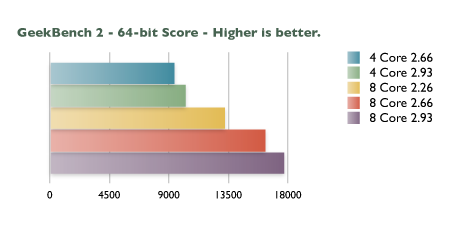
        In testing the new Early 2009 'Nehalem' Mac Pro machines, we first ran two popular benchmarking programs, Cinebench and Geekbench on the stock machines as received by Apple. In each benchmarking suite, the machines are run through a series of tests that tax the memory, video card, processors, etc. and issues a score. The higher the score is, the more powerful machine overall you are using. These benchmarks are great if comparing two or more systems against each other, but sadly they do not show any "real-world"perfomance gains in their results.

        CINEBENCH Score
        Mac Pro 'Nehalem' (Early 2009)
        Quad Core 2.66 GHz
        14251

        Mac Pro 'Nehalem' (Early 2009)
        Quad Core 2.93 GHz

        15800

        Mac Pro 'Nehalem' (Early 2009)
        8-Core 2.26 GHz

        19642
        Mac Pro 'Nehalem' (Early 2009)
        8-Core 2.66 GHz
        23408
        Mac Pro 'Nehalem' (Early 2009)
        8-Core 2.93 GHz
        25636
        Mac Pro 'Harpertown' (Early 2008)
        8-Core 3.0 *
        19875

        Mac Pro 'Woodcrest'
        4-Core 2.0 GHz *

        7468

        Cinebench Score

        GEEKBENCH 2 - 64 bit
        Mac Pro 'Nehalem' (Early 2009)
        Quad Core 2.66 GHz
        9390

        Mac Pro 'Nehalem' (Early 2009)
        Quad Core 2.93 GHz

        10236

        Mac Pro 'Nehalem' (Early 2009)
        8-Core 2.26 GHz

        13204
        Mac Pro 'Nehalem' (Early 2009)
        8-Core 2.66 GHz
        16262
        Mac Pro 'Nehalem' (Early 2009)
        8-Core 2.93 GHz
        17682
        Mac Pro 'Harpertown' (Early 2008)
        8-Core 3.0 GHz *
        10263

        Mac Pro 'Woodcrest'
        4-Core 2.0 GHz *

        4522

        GeekBench 2 - Test

        *Figures in grey fields are from machines prior to the 'Nehalem' line of machines and have been provided for comparitive purposes only and are not included in the charts.


        In order to effectively "real-world" test a machine, a suite of specific, measurable, accurate and repeatable tests must be developed that fully utilize all the available assets of the computer. Unfortunately for our testing (but fortunately for Apple), the Mac Pro is a machine that far surpasses the capability of the current Mac OS X Leopard operating system. OS X 10.5 is a 32-bit operating system which inherrently is limited to 3GB of memory usage per process. After the 3GB of real usage is attained, the rest of the memory in the system is essentially not recognized as being available to use. Snow Leopard, a true 64-bit operating system, should alleviate this dilemma and allow single processes to use all the memory available to it. This is a far cry from stating that 3GB is all that is needed in a machine until Snow Leopard is released.

        More memory in a system is always better, as many of us do not just run one program at a time. For example, at any given time in my workflow I can expect to have a mail client, an instant messaging client, several web browsers, iTunes, as well as the video editing, photo editing and/ or web design software I'm actually working on at the time all running simultaneously. The more memory my system has, the less often I encounter the dreaded spinning beachball or experience system hangs.

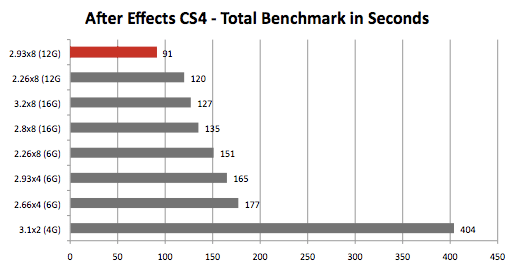
        Adobe After Effects Render Test

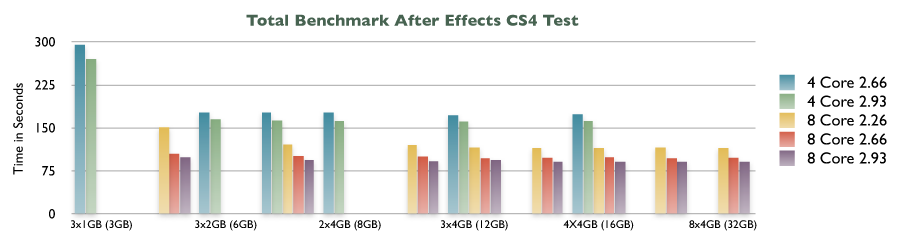
        To try to task the machine in one process, we ran the Total Benchmark created by Brian Maffitt. Adobe After Effects CS4 (and CS3 as well) spawns subprocesses -- one for each core -- when 'multiprocessing' is enabled in After Effects Preferences. Each of those subprocesses can grab up to 3GB of RAM. We observed an average of 80-90% of the memory in the system being utilized. With 16GB installed, over 13GB of the memory is actively addressed! Times are given in seconds (lowest is best).

        RAM Configuration

        3x1GB
        3.0GB

        6x1GB
        6.0GB
        3x2GB
        6.0GB
        4x2GB
        8.0GB

        2x4GB
        8.0GB

        6x2GB
        12.0GB

        3x4GB
        12.0GB

        8x2GB
        16.0GB
        4x4GB
        16.0GB

        6X4GB
        24.0GB

        8X4GB
        32.0GB
        Mac Pro 'Nehalem' (Early 2009)
        Quad Core 2.66 GHz
        295 n/a 177 177 177 n/a 172 n/a 174 n/a n/a

        Mac Pro 'Nehalem' (Early 2009)
        Quad Core 2.93 GHz

        270 n/a 165 163 162 n/a 161 n/a 162 n/a n/a

        Mac Pro 'Nehalem' (Early 2009)
        8-Core 2.26 GHz

        n/a 151 n/a 121 n/a 120 116 115 115 116 115
        Mac Pro 'Nehalem' (Early 2009)
        8-Core 2.66 GHz
        n/a 105 n/a 101 n/a 100 97 98 99 97 98
        Mac Pro 'Nehalem' (Early 2009)
        8-Core 2.93 GHz
        n/a 99 n/a 94 n/a 92 94 91 91 91 91
        Mac Pro 'Harpertown' (Early 2008)
        8-Core 3.0 *
        16.0GB 124 *Figures in grey fields are from machines prior to the 'Nehalem' line of machines and have been provided for comparitive purposes only and are not included in the charts.
        Mac Pro 'Woodcrest'
        4-Core 2.0 GHz *
        1.0GB 596

        Total lAfter Effects CS4 Test

        As additional memoy was added to the system, performance gains were evident until the processor speed became the determining factor on how quickly the test would complete.

        DigLloyd Photoshop Speed Action Test

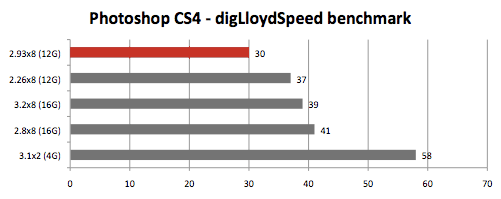
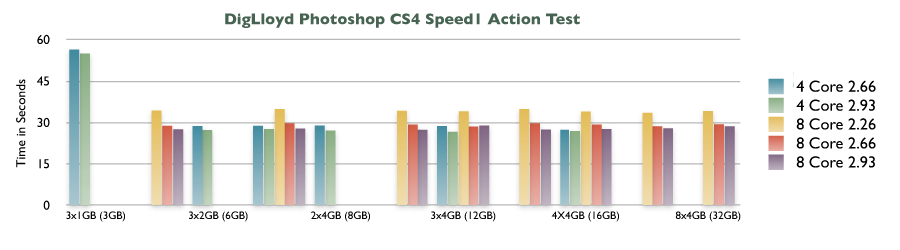
        Our standard in 'real-world' benchmarking has always been to use a Photoshop action timed to see how quickly it runs while more memory is added to the system. While Photoshop does not actively spawn subprocesses like After Effects, the system as a whole is actively used and the memory becomes more of a virtual scratch disk. The DigLloyd Photoshop speed action test consists of several processes using Photoshop CS4 that represent an average photo editing session of a photographer. This test and further details about configuring a Mac Pro for photography work is available at macperformanceguide.com and is a most invaluable site for any serious photographer. (Lower times are best)

        RAM Configuration

        3x1GB
        3.0GB

        6x1GB
        6.0GB
        3x2GB
        6.0GB
        4x2GB
        8.0GB

        2x4GB
        8.0GB

        6x2GB
        12.0GB

        3x4GB
        12.0GB

        8x2GB
        16.0GB
        4x4GB
        16.0GB

        6X4GB
        24.0GB

        8X4GB
        32.0GB
        Mac Pro 'Nehalem' (Early 2009)
        Quad Core 2.66 GHz
        56.47 n/a 28.78 28.82 28.97 n/a 28.72 n/a 27.4 n/a n/a

        Mac Pro 'Nehalem' (Early 2009)
        Quad Core 2.93 GHz

        55.00 n/a 27.28 27.66 27.09 n/a 26.65 n/a 26.90 n/a n/a

        Mac Pro 'Nehalem' (Early 2009)
        8-Core 2.26 GHz

        n/a 34.37 n/a 34.88 n/a 34.26 34.10 34.94 33.99 33.58 34.16
        Mac Pro 'Nehalem' (Early 2009)
        8-Core 2.66 GHz
        n/a 28.87 n/a 29.75 n/a 29.25 28.56 29.78 29.29 28.67 29.38
        Mac Pro 'Nehalem' (Early 2009)
        8-Core 2.93 GHz
        n/a 27.53 n/a 27.85 n/a 27.41 28.91 27.50 27.68 27.96 28.64
        Mac Pro 'Harpertown' (Early 2008)
        8-Core 3.0 *
        16.0GB 36.78 *Figures in grey fields are from machines prior to the 'Nehalem' line of machines and have been provided for comparitive purposes only and are not included in the charts.
        Mac Pro 'Woodcrest'
        4-Core 2.0 GHz *
        1.0GB 940.00

        Photoshop CS4 Test

        Again, after the initial speed boost in performance that additional memory provided, the scores leveled off and processor speed became the determining factor on how quickly the test would complete.


        In Conclusion

        More memory is always better especially when using multiple programs at once. In the After Effects test performance gains of up to 41% were obtained before the gains leveled off and Photoshop showed performance gains of up to 51%. Adding these performance gains across several processes at once can certainly cut down substantially on computing time.

        While not at all scientific, the general consensus among those testing the machines was that as more memory was installed, the machine ran better, seemed to bootup a bit faster and the test-to-test process seemed to quicken up. We are anxiously awaiting Apple's release of Snow Leopard in order to develop a full suite of 64-bit capable test. In the meantime, we suggest that adding the maximum memory will be most beneficial overall.

        We'd like to thank Rob-ART from Barefeats Labs and Lloyd Chambers of diglloyd.com and macperformanceguide.com for their contributions.


        Helpful Links
        • About Us
        • DIY Install Videos
        • Join our Affiliate Network
        • Where to Buy (opens in a new tab)
        • Accessibility Statement
        • Sustainability is Good Business
        • Join the MacSales.com Team
        • Media+Newsroom
        • Privacy Promise
        • MacSales.com for Business
        Join the MacSales.com Newsletter

        Join hundreds-of-thousands of tech enthusiasts across the planet and gain access to specials, clearance, and holiday savings on the OWC upgrades, drives, and docks everyone loves.

        Newsletter Subscription

        Please enter a valid email address.

        • bbb
        © 2000-2026 Other World Computing, Inc., All Rights Reserved. Site Terms Guest ID:
        Your Privacy Choices
        This item has been added to your cart