|
Performance Testing the PowerMac Blue & White / OS X using SpeedRun
Performance testing a computer to determine it's overall performance has been an interesting topic in our reviews section here at OWC for quite a while. Customers have always wanted to know exactly how much performance you can squeeze out of existing systems before buying a new one. The average user upgrades their system in some fashion or another at least 2 times in the life of the computer, some of us more than that even!
One of the most upgradable systems ever is the Power Macintosh G3 Blue & White (and also Power Macintosh G4 "Yikes") series. These machines were the first to use the drop open door style that the current Power Macintosh G4's still use - and with good reason, it's an excellent design.
In this test, we have focused on testing overall system performance using Mac OS X. Until recently, this has been very difficult to do as there were no testing / benchmarking utilities available. Until Danicsoft released SpeedRun a few weeks ago, your only choice was a stopwatch and using a multitude of applications. Not exactly easy to reproduce on different systems. SpeedRun is available as a free download from Danicsoft, and we will definitely be using it at OWC as a valuable benchmark tool!
 |
Overview
SpeedRun is a benchmarking program for testing how fast your computer really is. It runs several tasks, each with a specific focus, including ram, processor, graphics, and disk. This version has an even larger database of results and adds OS selection to the comparison window. |
So, onto the testing. In this series of tests we benchmarked a Power Macintosh G3 Blue & White (Rev "A" Logic board) with 128MB of PC-100 2-2-2 SDRAM (from OWC, of course!), an IBM DeskStar 20GB 5400RPM IDE hard drive (Model DTLA-305020), and the stock ATI Rage 128 PCI Video card. The only thing that had been upgraded in this system is the hard drive was replaced well over a year ago. Other than that, it is as it shipped from the factory.
The system was running Mac OS X 10.1.5, all system updates applied as of 6/28/02.
The only difference in the system at all during the testing was the processors tested. Replacing the processor in your system should be the first upgrade you do - it has a dramatic effect on the entire system performance as is displayed in the following chart and graph very clearly.
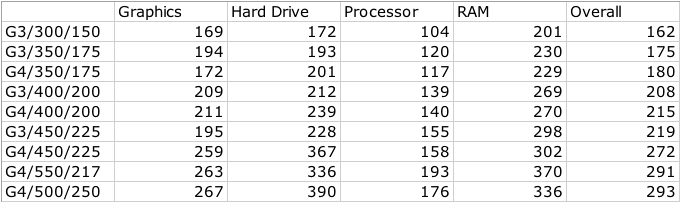
Replacing the processor in a Blue & White / G4 Yikes system is very simple and can be accomplished in less than 5 minutes. This system originally shipped with a 300MHz processor in it, and it was a fine performer in it's day. Check out what happens when you install a G4 processor in it - the memory performance and hard drive performance nearly DOUBLE - that's why upgrading to a G4 processor is so vital! Especially when using Mac OS X, since it takes full advantage of Altivec.
In the above list, the following processors were tested:
The other processors tested were stock processors that are no longer available for sale (at this time)
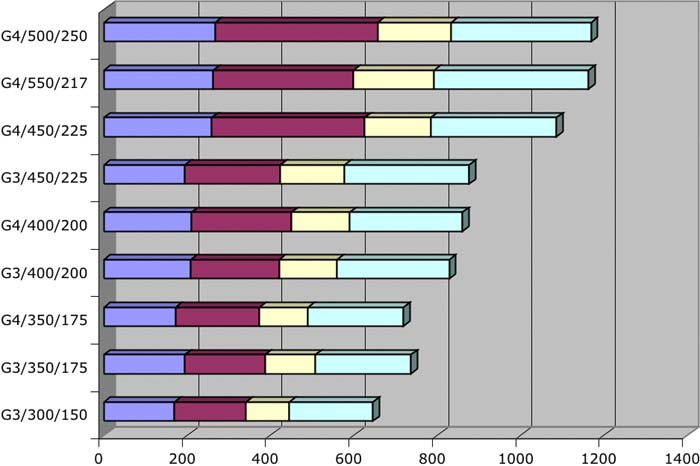

This is the same data as above except graphed to show overall performance. The XLR8 G4/500 processor was able to edge out the PowerLogix processor in overall performance because of it's full 1MB 2:1 backside cache. However, the PowerLogix processor could be clocked down to 500MHz in the Blue & White system and it will run the cache at the 2:1 ratio, just like the XLR8 processor.
And, even more interesting, the PowerLogix processor was able to be overclocked quite substantially - read on!


While testing, we discovered that the PowerLogix G4/550 was able to attain the extremely high speed of 650MHz. While this is definitely NOT what we recommend, overclockers (and one company!) have found that the PowerPC 7410 is a very good chip for those that wish to push the limit! Please do note that the cache chips on the PowerLogix upgrade are rated at 250MHz - and that is the limit that they will run.
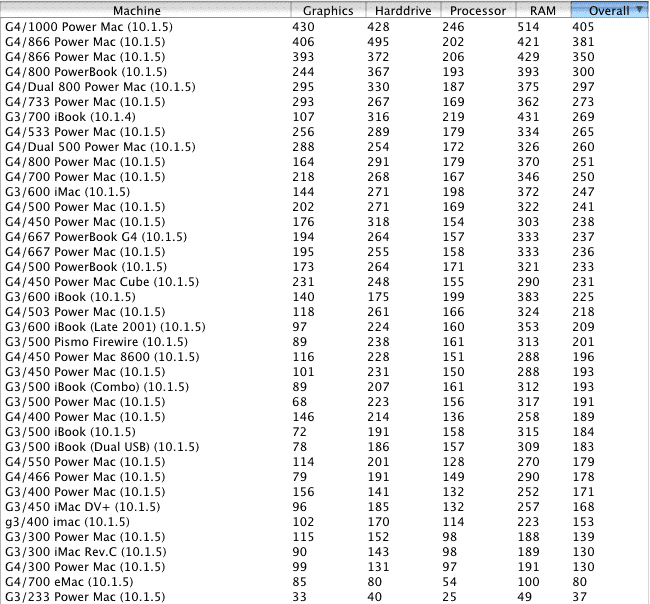
If you download SpeedRun, it comes with the following scores already submitted by users. If you run a benchmark using this program, we encourage you to send the scores to Danicsoft for future use!
Note that the upgraded Blue & White G3 system compares very favorable with the G4/733 Power Macintosh. Because of the upgrade having a full 1MB backside cache, it's able to keep up with a processor over 200MHz faster than it's running. It's not all about speed - it's about overall performance of the upgrade.
|


 1-800-275-4576

