Free Shipping available on orders $299 & up!Shop our Specials»
  • Business Icon For Business & More icon arrow
    • Creative, Production & PostCreative, Production & Post
    • Corporate & EnterpriseCorporate & Enterprise
    • Higher EducationHigher Education
    • State, Local & K-12 EducationState, Local & K-12 Education
    • House of WorshipHouse of Worship
    • Systems IntegratorSystems Integrator
    • HealthcareHealthcare
    • Federal, State & Local GovernmentFederal, State & Local Government
    • Join Today!

      Already registered? Sign In

  • Region: Canada icon arrow
    • Select your preferredcountry / region:

    • USA RegionUSA + International
    • Canada RegionOWC Canada

    • Experience local shipping options and optimized product inventory for your region.

  • Phone Icon1-800-275-4576
  • Intl: 1-815-338-8685
MacSales.com Powered By OWC
Site Search
  • Blog
  • Support
  • Account
    • Hello, Sign In
    • My Account
    • Order Status
    • Write A Review
    • Warranty & Returns
  • Cart
MacSales.com Powered By OWC
  • Support
  • Chat Contact
  • Account
    • Hello, Sign In
    • My Account
    • Order Status
    • Write A Review
    • Warranty & Returns
  • Cart
  • Specials & Featured
  • Rocket Yard Blog
  • Chat
  • Support
      • Shop All
        • Internal Drives
        • External Drives
        • Apple & Macs
        • Docks & Connectivity
        • Cards & Readers
        • Batteries
        • Software & Apps
        • Cables & Adapters
        • Memory
        • PCIe Expansion
        • Specials & Featured
        Installing OpenGL 1.2.1 on a system running Mac OS 8.6

        OWC NOTE: Special thanks to Martin T. for the initial information that made this article possible!

        Many people are still running Mac OS 8.6. And why not? It's one of the most stable systems to ever come out of Cupertino and it still allows the use of most software.

        One of the most desirable features that Mac OS 8.6 did not include is definitely OpenGL support. And that means you can't install an ATI RADEON 7000 PCI card either - the 2nd most popular item for older systems.

        Why not install OpenGL manually? Follow these directions and have the best of both worlds - a stable OS for your older system and a fast video card! :>)


        Test System Specs:

        Power Macintosh 7300/200

        RAM:

        • 1GB RAM (8 128MB Fast Page DIMMS from OWC)

        Processor:

        • XL8 MACh Carrier SSE G4/450

        PCI Cards:

        • ATI RADEON 7000 PCI 32MB Video Card
        • PowerLogix RapidFire PCI FireWire/USB Card
        • ACARD ATA/66 IDE Hard Drive Controller Card

        Hard Disk:

        • 10GB Western Digital Caviar 7200RPM IDE Hard Drive

        CD-ROM:

        • Stock 12x Apple CD-ROM

        TomeViewer 1.3d3
        ATI Retail Update - July 2002 (NOTE - apparently ATI removed the unsupported install feature from later versions - the July 2002 issue is mirrored here)
        Apple OpenGL 1.2.1


        1. Download the above listed software.

        2. Once downloaded, start by installing the ATI Retail Update software. It will give you a dialog box warning that this software was not designed for systems older than Mac OS 9.1, but conveniently allows you to continue. Once the software has installed, select the quit option the installer offers instead of restarting.

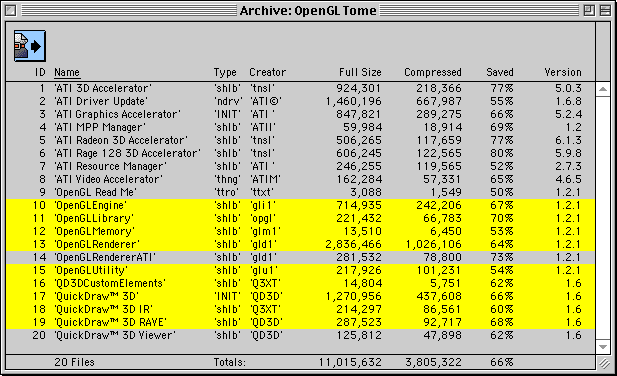
        3. Double click on the Apple OpenGL 1.2.1.smi image to mount it on your desktop. Drag the OpenGL Tome file from that mounted disk image onto the TomeViewer application to extract the following files.

        TomeViewer 1.3d3 window showing the 9 files to be extracted

        Shift-Click on the highlighted items and then click the blue button at the top of the window to extract the files to your hard drive. I suggest creating a new folder to save to, and then click the "All" button in the save dialog box to batch extract all files.

        4. Drag the 9 extracted files to you extensions folder (or onto your closed system folder, it will place them in the folder for you).

        5. Restart

        6. Install an application that uses OpenGL and verify it is functioning properly. I installed Quake2 and was pleased to see that the once unsupported game using that system is functioning very nicely, even getting 30fps at 1024x768 on this older system. :>) That's all there is to it! Have fun!

        Helpful Links
        • About Us
        • DIY Install Videos
        • Join our Affiliate Network
        • Where to Buy (opens in a new tab)
        • Accessibility Statement
        • Sustainability is Good Business
        • Join the MacSales.com Team
        • Media+Newsroom
        • Privacy Promise
        • MacSales.com for Business
        Join the MacSales.com Newsletter

        Join hundreds-of-thousands of tech enthusiasts across the planet and gain access to specials, clearance, and holiday savings on the OWC upgrades, drives, and docks everyone loves.

        Newsletter Subscription

        Please enter a valid email address.

        • bbb
        © 2000-2026 Other World Computing, Inc., All Rights Reserved. Site Terms Guest ID:
        Your Privacy Choices
        This item has been added to your cart