Performance benchmarking using Adobe Photoshop 7.0
by Jamie Dresser
Important Note: This was written back when Photoshop 7 was the most current version available. Current testing for the OWC Benchmark results is performed using Adobe Photoshop 8, part of the Adobe Creative Suite. Testing methodology is identical.
Recently, here at OWC we had been using a simple 5 routine action script to help determine processor performance with different upgrade cards. When we received our first dual processor upgrades from PowerLogix last week, (click here to view last week's first article reviewing those cards) it became very apparent that the action routines being performed by using the old script were not strenuous enough to show any performance gain. Other than the normal performance gains you would see with raw clock speed increases. Some Photoshop filters and tasks are accelerated when dual processors are used, other actions do not show as much of a gain, and that is why a new method of testing is needed. This was a big problem when trying to show the real world benefits of using a dual processor system.
We started to compare our Photoshop benchmarking with that of other review sites, and while none has an action script that is an "industry standard", the closest thing to one is PSBench7. Please take a few moments and look at their site, and you will get an idea of how their benchmark utility works.
Unfortunately, with PS7Bench I ran into some problems. PSBench7, while being an awesome test utility, does not exactly shine when performing repetitive testing procedures. I performed PS7Bench's 50MB file test, as it is available for download here, in it's entirety. That process on my PowerMac G4/733 QuickSilver test system took me approximately 2 hours. (A bit more actually). And that 2 hours was concentrating on recording each task's score, 3 times. PS7Bench runs each test 3 times and you have to manually average each run, and add them up to achieve a total score. By hand. Ouch! Once the first run was completed, I knew that because of the amount of processors I had to test that it would not be a good idea to tie up my time for at best 28 hours. That's just not a good way to manage my time. :>)
So. I created a benchmark action based loosely on the same tests that PSBench7 utilitizes, except without all of the repetitive actions that PSBench7 includes. PSBench7 runs a routine, and the uses the revert function to back up a step, and then executes a new action on the originally created file - basically performing the action on a brand new document that has never been modified. No real artist would do this - so why should we test Photoshop that way? An action script is normally performed to create a series of filters and actions on a document, in order - not "do step one, revert back to the original file, do step two, revert...", etc.
You can download this action script here.
This new benchmark action I created does not suffer from these issues, and to be fair I have run the action script multiple times and averaged the scores (scores seem to vary about 1%, very accurate IMHO).
The filters and actions performed by this script are as follows:
Rotations
Blurs
- 3 Different Gaussian Blurs
Unsharp Masks
- 3 Different Unsharp Masks, Multiple Levels
Conversions
Filters
Reductions
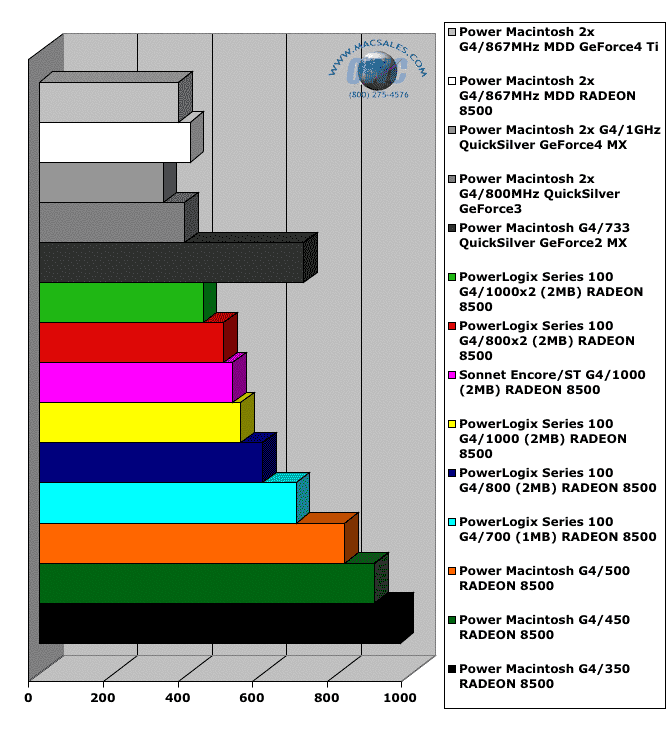
The above tests were all performed (with the exception of the top 5 gray bar denoted tests) in a Apple Power Macintosh G4/AGP "Gigabit Ethernet" system with the following components installed:
In performing these benchmarks, a couple of very interesting things happened. First, I had initially attempted to perform the tests using 256MB of RAM, and the scores suffered incredibly. The first card I tested was the PowerLogix 2x800 G4 and with 256MB of RAM, the test took a whopping 16:20 to complete. I then replaced the 256MB chip with two 512MB chips, and the performance jumped nearly 2x, taking 8:17 to complete. I then added a third chip bringing the memory up to 1.5GB, and the test performed in almost the exact time, 8:15. Therefore, I determined that 1GB was a sufficient amount to require for the testing and it more than proved that Photoshop's performance is definitely accelerated by having an adequate amount of RAM. The "old school" rule of thumb used to be 3x the memory of the largest image you were manipulating. In this case I think 5x or even more is a better scenario, but you could tell that 1.5GB was overkill and exceeded the requirements of the action script.
So, moral of this part of the review, BUY MEMORY! I feel that 1GB is a minimum if you are creative with your Macintosh, OS X loves memory and it's extremely inexpensive right now. You can buy 1GB of SDRAM for any of the systems tested in this benchmark article for under $100! That's just incredible considering what the price of memory was a year or two ago. The first upgrade you should always make to your system is RAM and this test beats that message home, that's for sure.
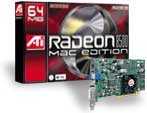
The next thing that happened that was an eye opener. The fact is that the video card on any of these upgrades does make a significant difference. Compare the two scores at the top of the graph. They are two brand new PowerMac G4/867x2 Mirrored Drive Door systems, one with a RADEON 8500 video card installed, and one with a top of the line nVidia GeForce4 Ti 4600 card. The GeForce4 was a full 30 seconds faster than the RADEON 8500. Although it carries more than double the price tag, speed does cost money in that case. The RADEON 8500 is a stellar performer in it's own right and a bargain value when you look at the price/performance ratio.
All in all, this new benchmarking test is going to pay dividends down the road as we start seeing future upgrades, such as the PowerLogix Series 133 upgrades for Digital Audio and Quicksilver G4 systems. Expect this test to become a centerpoint of all of our future head to head shootouts. :>)
|
Other products tested in this article:
|
|
|
|
|
|
|
|
|
|
|
|
PowerLogix PowerForce Series 100 Single G4
|
PowerLogix PowerForce Series 100 Dual G4
|
Sonnet Encore/ST Single G4
|
ATI RADEON 8500 PCI Video Card
|
|
|
|
|
|


 1-800-275-4576