Free Shipping available on orders $299 & up!Shop our Specials»
  • Business Icon For Business & More icon arrow
    • Creative, Production & PostCreative, Production & Post
    • Corporate & EnterpriseCorporate & Enterprise
    • Higher EducationHigher Education
    • State, Local & K-12 EducationState, Local & K-12 Education
    • House of WorshipHouse of Worship
    • Systems IntegratorSystems Integrator
    • HealthcareHealthcare
    • Federal, State & Local GovernmentFederal, State & Local Government
    • Join Today!

      Already registered? Sign In

  • Region: Canada icon arrow
    • Select your preferredcountry / region:

    • USA RegionUSA + International
    • Canada RegionOWC Canada

    • Experience local shipping options and optimized product inventory for your region.

  • Phone Icon1-800-275-4576
  • Intl: 1-815-338-8685
MacSales.com Powered By OWC
Site Search
  • Blog
  • Support
  • Account
    • Hello, Sign In
    • My Account
    • Order Status
    • Write A Review
    • Warranty & Returns
  • Cart
MacSales.com Powered By OWC
  • Support
  • Chat Contact
  • Account
    • Hello, Sign In
    • My Account
    • Order Status
    • Write A Review
    • Warranty & Returns
  • Cart
  • Specials & Featured
  • Rocket Yard Blog
  • Chat
  • Support
      • Shop All
        • Internal Drives
        • External Drives
        • Apple & Macs
        • Docks & Connectivity
        • Cards & Readers
        • Batteries
        • Software & Apps
        • Cables & Adapters
        • Memory
        • PCIe Expansion
        • Specials & Featured

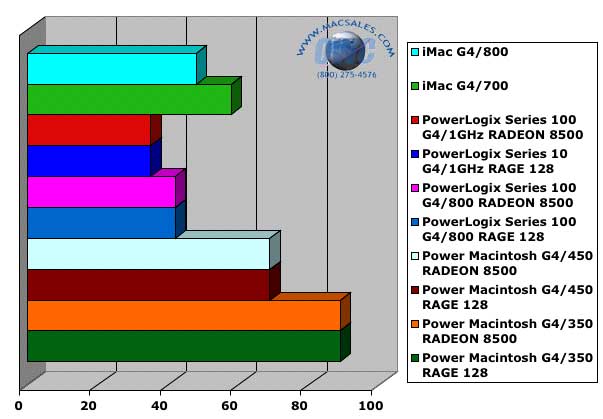
        Time to rip a 7:27 192kbps MP3 file using iTunes3. Shorter bars are better.

        I was astounded at the rate that the PowerLogix cards extracted audio. And, considering this is with the factory stock internal CD drive, I am anxious to try a speedy OWC Mercury FireWire CD-RW drive as the reading source - it should be even faster!
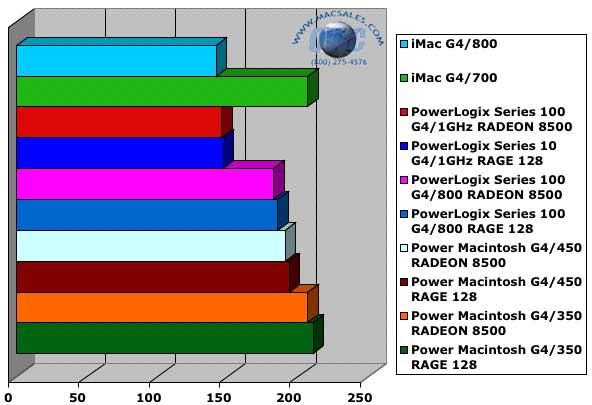

        Time to manipulate a 100MB test image using Adobe Photoshop 7.0. Shorter bars are better.

        Test was performed as follows -

        • Automatic script set up to open a 1600x1200 72 dpi image and perform the following functions-
        • Increase resolution to 600 dpi.
        • Convert from RGB to CMYK.
        • Rotate canvas 180 Degrees.
        • Apply a Gaussian Blur filter at 3.0 pixels.

        This yeilds an approximately 100 MB test file.
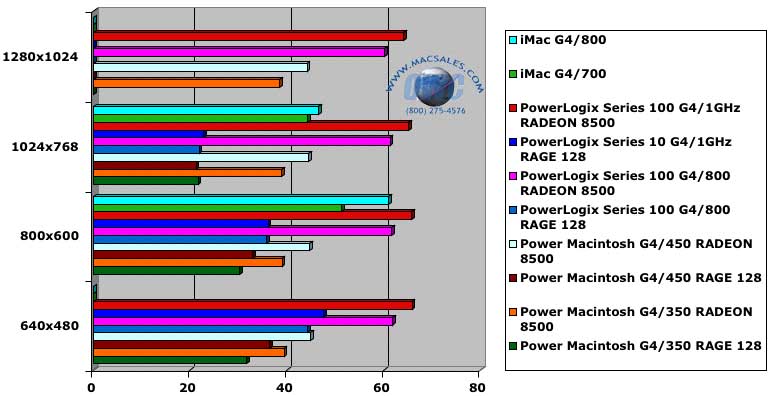

        Quake 3 testing - Frames Per Second. Longer bars are better.

        Set Quake's settings to HIGH QUALITY and only adjust the resolution - nothing fancy, but repeatable honest scores. :>) If you want to tweak your config file for even more performance, you can tweak your config file to get faster framerates (at the loss of some detail).

        Note - some scores are blank becaue either it is not the video display's native resolution (iMac scores) or the video card could not drive the monitor at the specified resolution (RAGE 128)

        Helpful Links
        • About Us
        • DIY Install Videos
        • Join our Affiliate Network
        • Where to Buy (opens in a new tab)
        • Accessibility Statement
        • Sustainability is Good Business
        • Join the MacSales.com Team
        • Media+Newsroom
        • Privacy Promise
        • MacSales.com for Business
        Join the MacSales.com Newsletter

        Join hundreds-of-thousands of tech enthusiasts across the planet and gain access to specials, clearance, and holiday savings on the OWC upgrades, drives, and docks everyone loves.

        Newsletter Subscription

        Please enter a valid email address.

        • bbb
        © 2000-2026 Other World Computing, Inc., All Rights Reserved. Site Terms Guest ID:
        Your Privacy Choices
        This item has been added to your cart