Free Shipping available on orders $299 & up!Shop our Specials»
  • Business Icon For Business & More icon arrow
    • Creative, Production & PostCreative, Production & Post
    • Corporate & EnterpriseCorporate & Enterprise
    • Higher EducationHigher Education
    • State, Local & K-12 EducationState, Local & K-12 Education
    • House of WorshipHouse of Worship
    • Systems IntegratorSystems Integrator
    • HealthcareHealthcare
    • Federal, State & Local GovernmentFederal, State & Local Government
    • Join Today!

      Already registered? Sign In

  • Region: Canada icon arrow
    • Select your preferredcountry / region:

    • USA RegionUSA + International
    • Canada RegionOWC Canada

    • Experience local shipping options and optimized product inventory for your region.

  • Phone Icon1-800-275-4576
  • Intl: 1-815-338-8685
MacSales.com Powered By OWC
Site Search
  • Blog
  • Support
  • Account
    • Hello, Sign In
    • My Account
    • Order Status
    • Write A Review
    • Warranty & Returns
  • Cart
MacSales.com Powered By OWC
  • Support
  • Chat Contact
  • Account
    • Hello, Sign In
    • My Account
    • Order Status
    • Write A Review
    • Warranty & Returns
  • Cart
  • Specials & Featured
  • Rocket Yard Blog
  • Chat
  • Support
      • Shop All
        • Internal Drives
        • External Drives
        • Apple & Macs
        • Docks & Connectivity
        • Cards & Readers
        • Batteries
        • Software & Apps
        • Cables & Adapters
        • Memory
        • PCIe Expansion
        • Specials & Featured

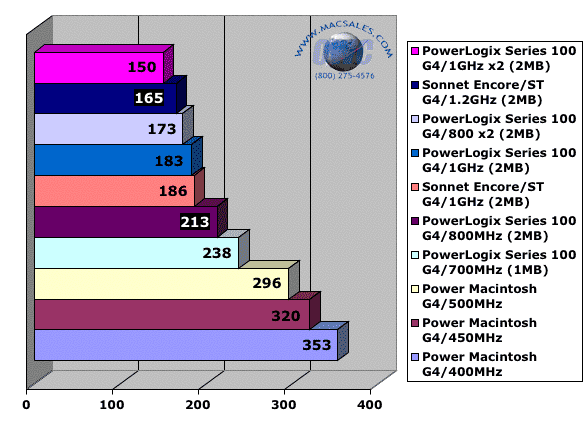
        Time to export a 151MB QuickTime movie to MPEG-2 using Final Cut Pro 3.0.2. Times are in seconds, shorter bars are better.

        The above test is the time it took to export a 503.7MB QuickTime raw DV movie to MPEG-2 format using Final Cut Pro 3.02 under Mac OS X.

        The test file was created using iMovie's included tutorial movies. Load all of the included clips and duplicate them 2x to have 3 movies in a row in the timeline. Save the file as raw DV footage and open the file using Final Cut Pro. In Final Cut Pro, then export the file to MPEG-2 format, with the following specifications set:

        • 720x480 Resolution
        • 6.5Mbps Bitrate
        • Include Audio
        • Write Report File

        The exported MPEG-2 file ends up being 140.1MB.

        This test is fantastic for a benchmark as I ran the export multiple times and the test scores were exactly the same every time. This removes any stopwatch variables (the export writes a text file with vital statistics when it runs, no stopwatch needed) and I was amazed that there was no variation - ever. Perfect for testing!


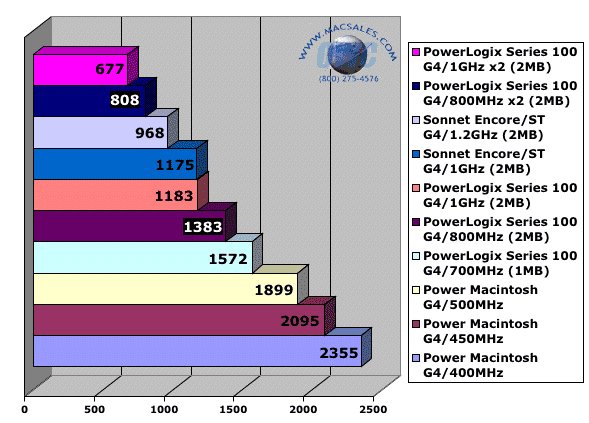
        Time to execute Photoshop 7 test script while iTunes visuals are running full screen in the background. All times in seconds, shorter bars are better.


        The above test is a seriously difficult task for any processor to run. If you wish to duplicate it, this is what is involved.

        • Set your monitor's resolution to 1280x1024, millions of colors.
        • Open iTunes and play a song. For this test I chose a 10 minute live version of a Rolling Stones track, and had it repeat in a loop so all of the processors tested in this series would be having the same visual patterns displayed.
          • Some of the iTunes visuals differ in CPU load, and this levels the playing field, so to speak.
        • Expand the iTunes window to 1280x1024
        • Activate the visual effects, at full screen resolution.
        • Open Photoshop
        • Select the action script to run, and start the stopwatch.

        The fact that both CPUs are basically running 100% for this entire test makes it an excellent stress test, and more than shows why a dual processor system is going to speed up your productivity. If you run more than one application at a time as most of us do, then it's without a doubt beneficial to have a 2nd processor. Mac OS X splits the load dynamically as needed between two processors. Even though in some general use tests dual processors don't show that dramatic of an improvement, this test certainly does!

        Look at the scores of the PowerLogix Single G4/800 and the PowerLogix Dual G4/800. TEN MINUTES faster using a dual processor! That's 23 minutes vs. 13 minutes to finish this test. Amazing! When used in direct comparison to a single processor system, this CPU load test is almost unfair, it's that dramatic of a difference having 2 processors working for you.

        The single 400MHz processor took a whopping 39 minutes to complete this test. Care to cut your computer's processing time in half or better? :>) Duals are a fantastic upgrade!

        For more information on the Photoshop Action script used to generate this test, visit this page.

        Helpful Links
        • About Us
        • DIY Install Videos
        • Join our Affiliate Network
        • Where to Buy (opens in a new tab)
        • Accessibility Statement
        • Sustainability is Good Business
        • Join the MacSales.com Team
        • Media+Newsroom
        • Privacy Promise
        • MacSales.com for Business
        Join the MacSales.com Newsletter

        Join hundreds-of-thousands of tech enthusiasts across the planet and gain access to specials, clearance, and holiday savings on the OWC upgrades, drives, and docks everyone loves.

        Newsletter Subscription

        Please enter a valid email address.

        • bbb
        © 2000-2026 Other World Computing, Inc., All Rights Reserved. Site Terms Guest ID:
        Your Privacy Choices
        This item has been added to your cart