Free Shipping available on orders $299 & up!Shop our Specials»
  • Business Icon For Business & More icon arrow
    • Creative, Production & PostCreative, Production & Post
    • Corporate & EnterpriseCorporate & Enterprise
    • Higher EducationHigher Education
    • State, Local & K-12 EducationState, Local & K-12 Education
    • House of WorshipHouse of Worship
    • Systems IntegratorSystems Integrator
    • HealthcareHealthcare
    • Federal, State & Local GovernmentFederal, State & Local Government
    • Join Today!

      Already registered? Sign In

  • Region: Canada icon arrow
    • Select your preferredcountry / region:

    • USA RegionUSA + International
    • Canada RegionOWC Canada

    • Experience local shipping options and optimized product inventory for your region.

  • Phone Icon1-800-275-4576
  • Intl: 1-815-338-8685
MacSales.com Powered By OWC
Site Search
  • Blog
  • Support
  • Account
    • Hello, Sign In
    • My Account
    • Order Status
    • Write A Review
    • Warranty & Returns
  • Cart
MacSales.com Powered By OWC
  • Support
  • Chat Contact
  • Account
    • Hello, Sign In
    • My Account
    • Order Status
    • Write A Review
    • Warranty & Returns
  • Cart
  • Specials & Featured
  • Rocket Yard Blog
  • Chat
  • Support
      • Shop All
        • Internal Drives
        • External Drives
        • Apple & Macs
        • Docks & Connectivity
        • Cards & Readers
        • Batteries
        • Software & Apps
        • Cables & Adapters
        • Memory
        • PCIe Expansion
        • Specials & Featured

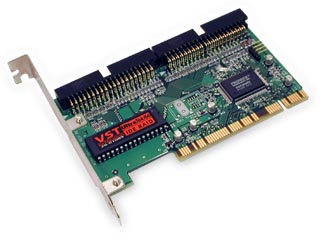
        VST UltraTek ATA/66 Ultra ATA PCI Controller with 7600 Review

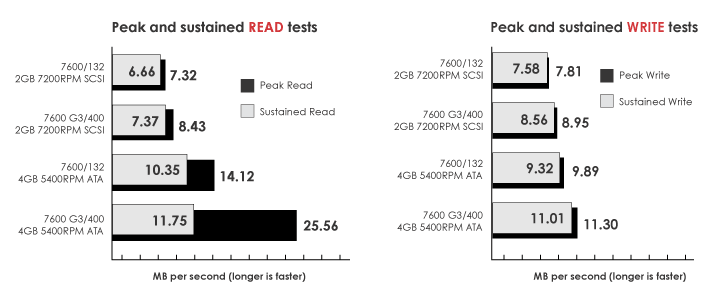
        (The testing components are a XLR8 Carrier Card with a G3/400MHz processor, stock 7600/132 with a 2GB SCSI 7200RPM drive and 112MB of RAM, VST UltraTek card, and a Quantum Fireball CA ATA/66 5400RPM drive. Test conducted with ExpressPro-Tools 2.3.2) Written by: Paul Roesner

        What is this graph?
        The graph below shows the read and write tests of drive performance with different system setup combinations in a 7600. For example: The stock 7600 scored a 6.66 sustained read and a 7.58 sustained write, while on the same computer with a G3/400MHz upgrade scored a higher 7.37 sustained read and a 8.56 sustained write.

        Keep in mind the 4GB ATA Quanutm drive that was used in this test had a slower RPM speed and seek time than the 2GB SCSI Quantum. However, it scored noticeably higher than the stock 2GB SCSI Quantum in the same tests! Imagine a ATA drive that is comparable in features to the 2GB SCSI drive!

        Installation is a snap!
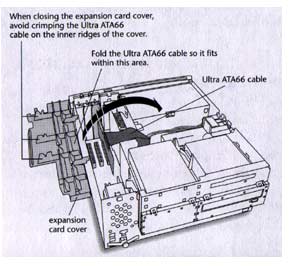
        Basically you take the UltraTek PCI card and install it into your PowerMac's open PCI slot. Take the ATA cable that came with the card and plug it into your new PCI card. Take your ATA drive, and plug the other end of the cable to it. Adjust the jumpers on your ATA drive, restart your computer, and format the HD if needed. You now have a fast ATA drive on your previously all SCSI PowerMac. No software or jumpers on the PCI card!
        What is in the box?
        VST's UltraTek ATA/66 comes with the VST UltraTek/66 card, a CD with SoftRAID Software (not used in this test) and documentation, two 80-wire/40pin ATA cables, a user manual, and a Power Supply "Y" Cable.

        Personal Thoughts
        At first I was skeptical about this product with it being the cheapest ATA PCI card in our line up. Then things started to take a turn with the extremely easy set up. I literally plugged everything in and it worked flawlessy the first time. Granted you have your drive setup properly and it's formatted.

        If your looking for more hard drive space and speed, this is the cheapest and easiest solution for you and your PowerMac. With the wide range of low cost, high capacity ATA hard drives available today, you have even more reason to take advantage of ATA. Those bars on top do not lie. Look at the read test results. The same computer with the same processor scored approximately twice as fast as the faster 2GB SCSI with the simple change of a ATA PCI card and a slower ATA drive! To add even more performance overall with your PowerMac, add a G3/G4 processor!! (shown in graph)

        2/5/01

        Helpful Links
        • About Us
        • DIY Install Videos
        • Join our Affiliate Network
        • Where to Buy (opens in a new tab)
        • Accessibility Statement
        • Sustainability is Good Business
        • Join the MacSales.com Team
        • Media+Newsroom
        • Privacy Promise
        • MacSales.com for Business
        Join the MacSales.com Newsletter

        Join hundreds-of-thousands of tech enthusiasts across the planet and gain access to specials, clearance, and holiday savings on the OWC upgrades, drives, and docks everyone loves.

        Newsletter Subscription

        Please enter a valid email address.

        • bbb
        © 2000-2026 Other World Computing, Inc., All Rights Reserved. Site Terms Guest ID:
        Your Privacy Choices
        This item has been added to your cart