Free Shipping available on orders $299 & up!Shop our Specials»
  • Business Icon For Business & More icon arrow
    • Creative, Production & PostCreative, Production & Post
    • Corporate & EnterpriseCorporate & Enterprise
    • Higher EducationHigher Education
    • State, Local & K-12 EducationState, Local & K-12 Education
    • House of WorshipHouse of Worship
    • Systems IntegratorSystems Integrator
    • HealthcareHealthcare
    • Federal, State & Local GovernmentFederal, State & Local Government
    • Join Today!

      Already registered? Sign In

  • Region: Canada icon arrow
    • Select your preferredcountry / region:

    • USA RegionUSA + International
    • Canada RegionOWC Canada

    • Experience local shipping options and optimized product inventory for your region.

  • Phone Icon1-800-275-4576
  • Intl: 1-815-338-8685
MacSales.com Powered By OWC
Site Search
  • Blog
  • Support
  • Account
    • Hello, Sign In
    • My Account
    • Order Status
    • Write A Review
    • Warranty & Returns
  • Cart
MacSales.com Powered By OWC
  • Support
  • Chat Contact
  • Account
    • Hello, Sign In
    • My Account
    • Order Status
    • Write A Review
    • Warranty & Returns
  • Cart
  • Specials & Featured
  • Rocket Yard Blog
  • Chat
  • Support
      • Shop All
        • Internal Drives
        • External Drives
        • Apple & Macs
        • Docks & Connectivity
        • Cards & Readers
        • Batteries
        • Software & Apps
        • Cables & Adapters
        • Memory
        • PCIe Expansion
        • Specials & Featured

        Sidebar Shortcuts
        by M. Chris Stevens

        You know, its kind of funny how we take various features of OSX for granted. We use these features every day and we think nothing of them. Then someone else, who may or may not have been using a Mac as long (if not longer) than you sees you do something (or discovers it on their own) and they’re totally amazed. That sense of “Wow, that’s cool!” that we initially felt when we started using that feature is then extended.

        Recently, there was a similar occurrence here at the office regarding the sidebar. While “sidebar” can reference a number of different things in the computer world (as well as in legal and publishing terms), when in OS X, its usually a reference to the list of folders and drives in each Finder window.
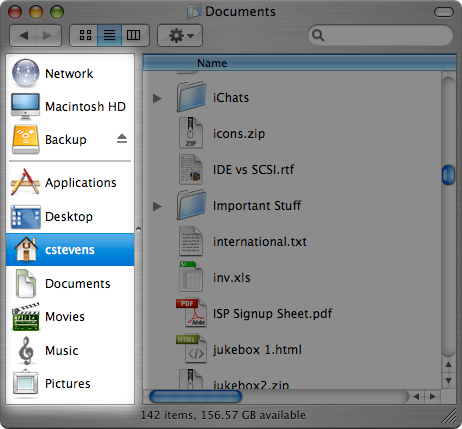
        The Sidebar showed up in OS X 10.3. Other than a few cosmetic tweaks here and there, it is still essentially the same: a list of folders and volumes on your Mac, which you can use to access folders, files and applications directly from the Finder. Its kind of like a little, portable Dock in every Finder window.

        You’re also not limited to just the folders that are preset there, you can add any file/folder/application you want with a simple drag & drop. If you want to remove it from the sidebar, simply drag it out and it disappears in a puff.

        I think, however, that the best illustration of this, though, would be through video. Although I recorded this under OS X 10.4, the process is pretty much the same with Panther and Leopard, as well.

        Hopefully, this will prove useful to some of you, either by introducing something new, or by reintroducing you to an old friend.

        Now if you’ll excuse me, I have a sidebar of my own to rearrange...

        Helpful Links
        • About Us
        • DIY Install Videos
        • Join our Affiliate Network
        • Where to Buy (opens in a new tab)
        • Accessibility Statement
        • Sustainability is Good Business
        • Join the MacSales.com Team
        • Media+Newsroom
        • Privacy Promise
        • MacSales.com for Business
        Join the MacSales.com Newsletter

        Join hundreds-of-thousands of tech enthusiasts across the planet and gain access to specials, clearance, and holiday savings on the OWC upgrades, drives, and docks everyone loves.

        Newsletter Subscription

        Please enter a valid email address.

        • bbb
        © 2000-2026 Other World Computing, Inc., All Rights Reserved. Site Terms Guest ID:
        Your Privacy Choices
        This item has been added to your cart