|
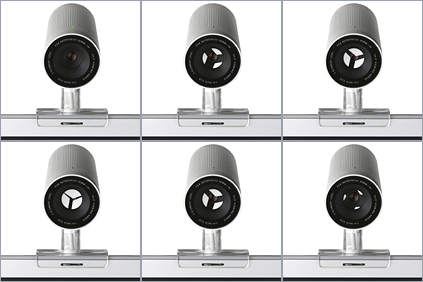 Adding to its growing list of Mac compatible gadgets, Apple recently released the iSight. Along with the release of the hardware came an unexpected software update. iChat is now known as iChat AV. The AV part of the name is where the fun starts. It stands for Audio/Video, and that is exactly what the new version of iChat does.
Forget about instant text messaging— now we’re talking video conferencing! Just install iChat AV (currently available as a public Beta) and plug in your iSight camera. It has a built-in noise canceling microphone and an auto focus lens. The camera comes with 3 different mounting brackets, which provide good versatility to those trying to give the iSight a permanent home on their desk.
iSight Note:
If you are worried about prying eyes, the iSight has a shade aperture built into the lens. Just turn the lens counterclockwise to open the aperture, and turn it clockwise to close it. With the aperture closed, you camera is powered down and incapable of shooting video. It is my guess that Apple engineers were fans of the first American Pie movie and wanted to keep Mac users from embarrassing ourselves online. :-) |
Connecting the cam is easy, your Mac’s FireWire bus powers the camera. Just plug the provided cable into your computer. Once the camera activates, iChat will automatically launch. You will still have the ability to do conventional chat with other iChat or AOL Instant Messenger users, but if your buddy has a camera setup on their system, you can establish a two-way videoconference with one click of the mouse.
As one might expect, only users with a broadband connection will be able to use the video feature. To give users more control over their Internet connection, iChat has a preference to cap bandwidth usage: the higher the throughput setting, the better the video quality.
Third Pary Video Solutions:
Third party FireWire Web Cams are also available. Unibrain offers the Fire-I. It lacks a microphone, but is a more cost effective solution than the iSight. Orange Micro offers two versions of the iBot. One features a built-in microphone while the other does not.
According to Apple, and FireWire equipped camcorder will also work with iChat AV.
|
Of course, video chat is not new to the online community. Mac and PC video packages have been around for years. However, all of them were proprietary with a limited install base and they generally offered very poor results. After spending the last week working with iChat AV, I am confident this hardware/software solution will be the first to dominate the market. Even in its Beta form, iChat AV offers unparalleled quality and performance. And since iChat is based on AOL’s Instant Messenger client, it draws on a massive base of previously installed users.
Apple plans to let PC software engineers draw on the APIs they have developed in the creation of this software. This should produce several iChat compatible software packages on the Windows platform. At a point in the near future, video chat will likely be as popular as text based chat today.
If you don’t have broadband access, Apple has not forgotten about you. iChat AV has a voice chat option that works nearly as well as a telephone. All you need is a 56Kbps modem connection to the Internet and a friend who also has iChat AV installed. As long as you both have microphones attached to your computers, you can communicate as freely as you can via telephone.
Some Macs have built-in microphone, but if yours doesn’t just add an Apple PlainTalk compatible microphone and you are in business. If your Mac doesn’t have a built-in microphone port, the Griffin iMic is an easy way to add a standard microphone port to any Mac with a USB port. MacAlly offers a stylish option. The iVoice II is a USB microphone that is well suited for being left out on the desktop at all times. It also features line-in and line-out ports.
The Apple iTalk is another great example of the fusion of software and hardware. The hardware is easy to install while the software is intuitive and easy to learn. With the iSight, iChat AV requires no configuration to get it up and running. Together they provide a powerful new technology that was lacking in the Mac community.
iChat Note:
IChat AV is still a beta release. This means that Apple is still developing the product. Users of the beta will likely experience quirky behavior. If you do, and are interested in providing feedback, Apple has provided a way to submit bug reports. Just choose "Provide iChat Feedback" from the iChat menu. |
|


 1-800-275-4576

