|
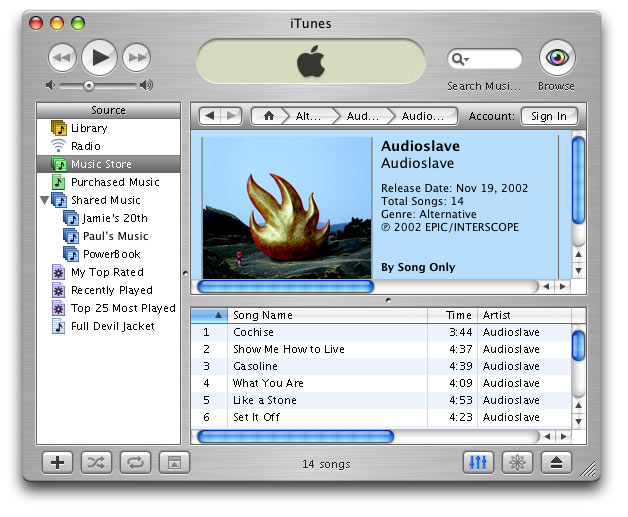
With this week’s update of iTunes to 4.0, Apple again added an unprecedented number of new and innovative features. Many of these new features are likely to make PC users green with envy. This is likely why Apple plans a PC version of iTunes near the end of this year.
iTunes has always been an innovative MP3 client. Its power and ease of use quickly became a model to which all other MP3 clients were measured. This week Apple took the application where none have gone before. New features include:
- support for the powerful new AAC encoding format
- The ability to share your play list on your local area network (or the internet)
- The ability to purchase music on demand
- A new iPod was release that integrates tightly with the new software
Shared Play Lists:
Last year, a creative member of the Mac community wrote a small application called iCommune. It really only did one thing, but it did it very well. It allowed an iTunes library to be shared with other iTunes clients on the same network. The application was short lived as Apple Corporate slapped the author, James Speth, with a Cease and Desist order claming that the author had used iTunes APIs that he had not been licensed to use. And while that shutdown the project for a while, the author recently came back with a new version of iCommune. It provides the same functionality, but is not written with Apple’s iTunes API, and is now open source.
Not to be outdone, Apple added this feature to iTunes 4. A new option located in the preferences of iTunes allows anyone to share their play list with other iTunes clients on the network. Added features allow us to specify only designated play lists as shared, and even password protect the music that we do share. And while this was undoubtedly the direction Apple intended to go when they built this functionality into the API in the first place, I think more credit should go to James Speth for beating them to the punch, and his determination to bring his product to market even if it meant starting from scratch without Apple’s code. I doubt we have heard the last of James. I am sure we will see some interesting new iTunes mods in the near future. It is difficult to keep someone that creative from doing what they do best.
If you have already had the pleasure of playing with the new iTunes, you may have run into some small issues with shared play lists. If you run OS X’s built in firewall, you will need to open an additional port to allow others to play your shared music. Simply open your Sharing System Preference and click on the Firewall tab. If your firewall is on, you may need to click New and add port number 3689. In my experience, others were able to see my play list without opening this port, but were unable to play the MP3s.

Tip:
If you are interested in sharing your music with a friend over broadband, Apple did not make it as easy as it should be, but it is possible. You must know the IP address of the remote computer that is running iTunes. Just open the Safari browser and enter this command into the address field: daap://192.168.7.15 (in place of 192.168.7.15, enter the IP address you would like to connect to). Safari knows iTunes is a helper application that responds to the daap:// prefix and passes the request off in turn. It should be possible to set up Explorer or Netscape to do the same if you set up the necessary helper information in the browser preferences. |
The Music Store:
The most innovative new feature built into iTunes 4 is something Apple calls the Music Store. Since the widely publicized birth and demise of Napster, it is likely no one in our online community has gone with out feeling the wrath of DRM. DRM is short for Digital Rights Management, and whether you love it or hate it, it will inevitably touch your life in some meaningful way.
Since digital media is so easy to duplicate and distribute, Digital Rights Management is a serious concern. This has been proven with any number of peer-to-peer online file sharing clients the freely distribute music and software to anyone in the online community. Digital Rights Management is supposed to be a way of securing the rights of authors of both music and software. And, with the new resources built into iTunes, Digital Rights Management was of paramount concern to the music industry.
In the past, powerful lobbying from the recording industry brought about great change in the way we collected our music. In recent months, users have been taken to court over their right to freely distribute music online. In many of these cases, the end user lost. As a result, online music services of the past offered more restrictions on their product than services.
Apple has changed the rules and leveled the playing field. While an endeavor of this magnitude would not be allowed by the recording industry without serious concessions on the part of Apple, the Online Music Store does a tremendous job of keeping power and flexibility for its users.
Songs can be purchased one at a time for $0.99, and most complete albums are available for $9.99. For it’s part, Apple takes a small cut— the rest goes to the record label. All music is provided in 128Kbit AAC format, the high quality file format that is moving to replace MP3. Built into the file format is the ability to restrict what the user can do with it. For example, when you purchase a CD through the Music Store, your online account information is encoded into the files, tagging them with your profile. This is intended to discourage piracy. And, while you can keep your music on as many iPods as you like, your tracks may only belong to three iTunes libraries at any given time. If you want to burn the album to CD, you will need to create a play list. Once you do, that play list can only be burned to CD 10 times.
Workarounds:
While many of these restrictions might seem irritating, compared to other online music services, they are quite liberal. And for those who are interested, there are workarounds that allow you to circumvent some of these restrictions. Take, for example, the restriction that only allows your music to be in 3 iTunes libraries at one time. The securities are built into the AAC file format. iTunes makes it very easy to transcode your music to MP3 format, or even AIFF. At that point, you can easily add your files to the rest of your Macs because ripping the files to MP3 format eliminates that internal tags found in the AAC format.
Another example: the restriction that allows the user to burn their play list to only ten CDs. Ten copies of the album are likely enough for anyone, but I am told that if you simply rename the play list, you are good for another 10 burns. I have not tried this for myself. I really have no need for 10 copies of Full Devil Jacket, but it’s nice to know I can make them if I need to. Even in a worst-case scenario, nothing keeps me from burning my CD in iTunes, then turning around and using another application like Roxio Toast to make additional copies of my original.
 iPod:
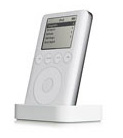
With the release of the new iTunes, Apple added a significant revision to the line of iPods as well. This marks the largest departure from the original design, to date. New buttons have been added to the device making it easier to use and the iPod is now thinner and has an increased storage capacity. Some of the ports have been moved around to make way for the new cradle that lets users both recharge their iPod and interface with the Mac in one easy step. And, of course, given iTunes new support for AAC format files, the new iPod will play the new format as well.
Tip:
If you have an older iPod, and want to play the new AAC formatted files, you are in luck. An update for the older iPods is available in the Software Update preference pane of your Mac. Make sure your iPod is attached to the computer and open Software Update. The new firmware will be downloaded bringing you up to date with Apple’s latest and greatest! |
Anyone trying to sell music over the Internet must walk a fine line to keep the service both worthwhile for subscribers as well as the recording industry. Apple appears to be walking that line with a grace and dignity that I have yet to see from another provider. The service would never have come to fruition if the record companies could not profit by it, and Apple has done a good job of protecting the artist’s rights without eliminating the freedoms demanded by users like us.
The restrictions we must deal with will likely only be a problem for those of us who would abuse the technology. And for those who are unwilling to use the service, there will always be a local music store. Apple has added some powerful new features to its product line, both hardware and software. Though it has only been a week, thus far, the press has received the new technology with unusually positive support and reviews. Only time will tell if the technology can be both profitable and useful, but one thing is for sure— this is a great time to own a Mac!
|


 1-800-275-4576