Free Shipping available on orders $299 & up!Shop our Specials»
  • Business Icon For Business & More icon arrow
    • Creative, Production & PostCreative, Production & Post
    • Corporate & EnterpriseCorporate & Enterprise
    • Higher EducationHigher Education
    • State, Local & K-12 EducationState, Local & K-12 Education
    • House of WorshipHouse of Worship
    • Systems IntegratorSystems Integrator
    • HealthcareHealthcare
    • Federal, State & Local GovernmentFederal, State & Local Government
    • Join Today!

      Already registered? Sign In

  • Region: Canada icon arrow
    • Select your preferredcountry / region:

    • USA RegionUSA + International
    • Canada RegionOWC Canada

    • Experience local shipping options and optimized product inventory for your region.

  • Phone Icon1-800-275-4576
  • Intl: 1-815-338-8685
MacSales.com Powered By OWC
Site Search
  • Blog
  • Support
  • Account
    • Hello, Sign In
    • My Account
    • Order Status
    • Write A Review
    • Warranty & Returns
  • Cart
MacSales.com Powered By OWC
  • Support
  • Chat Contact
  • Account
    • Hello, Sign In
    • My Account
    • Order Status
    • Write A Review
    • Warranty & Returns
  • Cart
  • Specials & Featured
  • Rocket Yard Blog
  • Chat
  • Support
      • Shop All
        • Internal Drives
        • External Drives
        • Apple & Macs
        • Docks & Connectivity
        • Cards & Readers
        • Batteries
        • Software & Apps
        • Cables & Adapters
        • Memory
        • PCIe Expansion
        • Specials & Featured

        AGP Dual Compatibility
        Determining dual processor compatibility with Power Mac® G4 'Gigabit Ethernet'.


        uni-north

        From OS X:

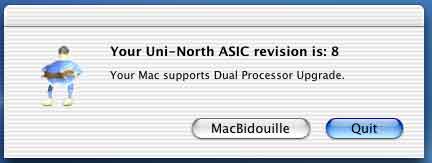
        Download and run this utility. It will report the ASIC revision of the Uni-N and whether your machine is dual processor compatible.
        Note: Macs® that have the proper UniNorth chip revision but have no chance of ever accepting a dual processor (such as Titanium PowerBooks®) will be shown as "Your Mac supports Dual Processor Upgrade." Therefore please use this utility only on Power Mac G4s. Application courtesy macbidouille.com, the French equivalent of xlr8yourmac.com.


        From OS 9.1.x or 9.2.x (will not work with earlier versions of Mac OS):

        Run Apple® System Profiler.
        Select "New Report" from under the file menu.

        In the New Report window, check "System Profile" and "Hardware overview" check boxes.

        When the report window appears, click the radio button next to "Text document."

        Identify your machine type by checking the "Model name:" line.

        "Power Mac G4 PCI Graphics": this model uses the PowerForce G4 ZIF and is not compatible with dual processors.

        "Power Mac G4 AGP Graphics" or "Power Mac G4":

        Read the last text under the "Hardware overview" section.

        If it says uni-n: 7 (or greater) your machine is dual compatible.

        Helpful Links
        • About Us
        • DIY Install Videos
        • Join our Affiliate Network
        • Where to Buy (opens in a new tab)
        • Accessibility Statement
        • Sustainability is Good Business
        • Join the MacSales.com Team
        • Media+Newsroom
        • Privacy Promise
        • MacSales.com for Business
        Join the MacSales.com Newsletter

        Join hundreds-of-thousands of tech enthusiasts across the planet and gain access to specials, clearance, and holiday savings on the OWC upgrades, drives, and docks everyone loves.

        Newsletter Subscription

        Please enter a valid email address.

        • bbb
        © 2000-2026 Other World Computing, Inc., All Rights Reserved. Site Terms Guest ID:
        Your Privacy Choices
        This item has been added to your cart